- OAuth 2.0 with Gmail over IMAP for web applications
- OAuth 2.0 with Gmail over IMAP for installed applications
- OAuth 2.0 with Gmail over IMAP for service account (Google.Apis)
- OAuth 2.0 with Gmail over IMAP for service account (DotNetOpenAuth)
 In this article I’ll show how to access Gmail account of any domain user, using OAuth 2.0, .NET IMAP component and service accounts. The basic idea is that domain administrator can use this method to access user email without knowing user’s password.
This scenario is very similar to 2-legged OAuth, which uses OAuth 1.0a. Although it still works, it has been deprecated by Google and OAuth 2.0 service accounts were introduced.
The following describes how to use XOAUTH2 and OAuth 2.0 to achieve the equivalent of 2-legged OAuth.
Google APIs console
First you need to visit the Google API Console and create a service account:
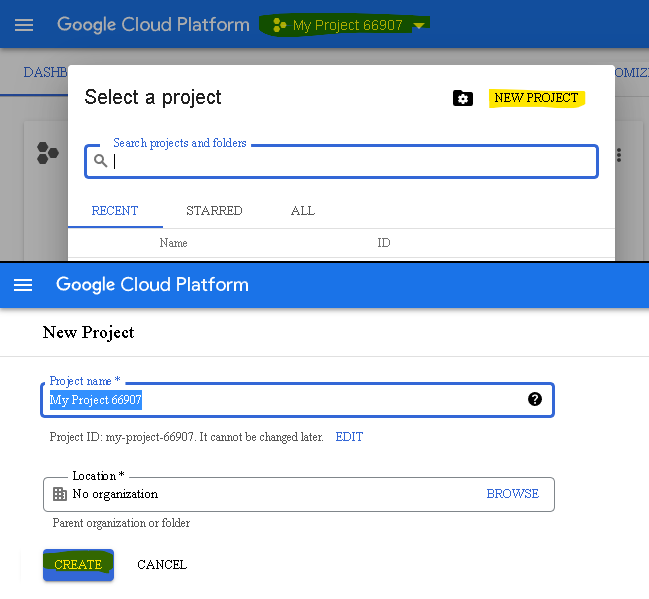
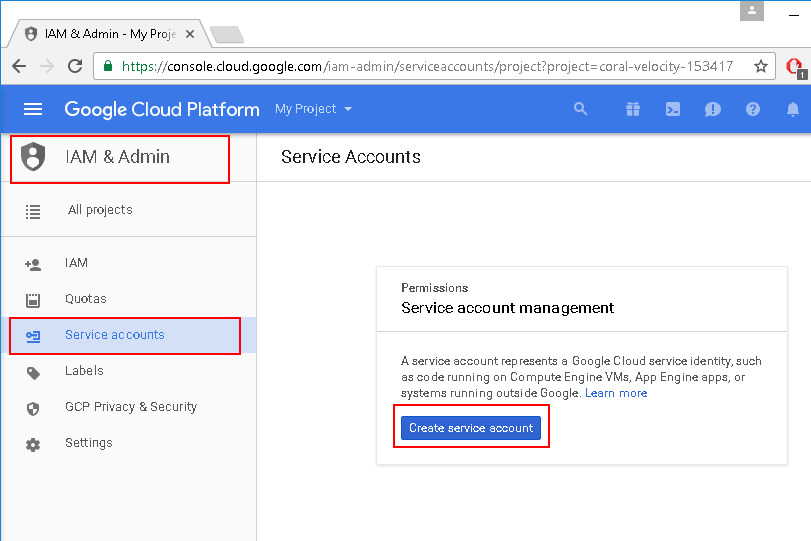
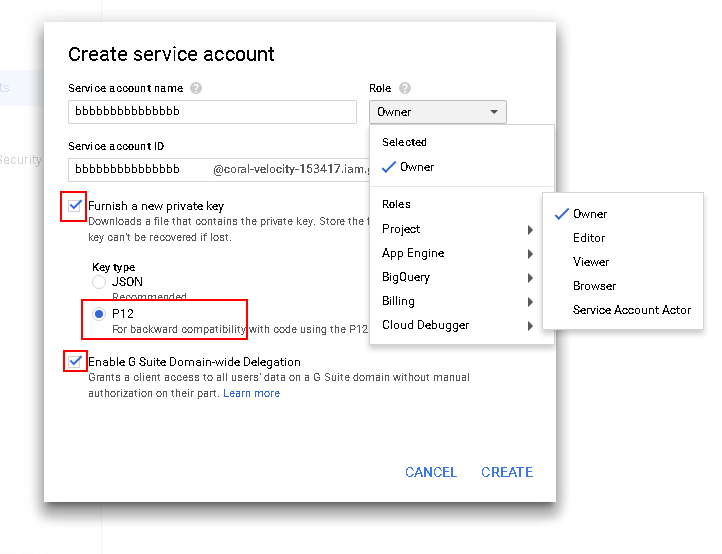
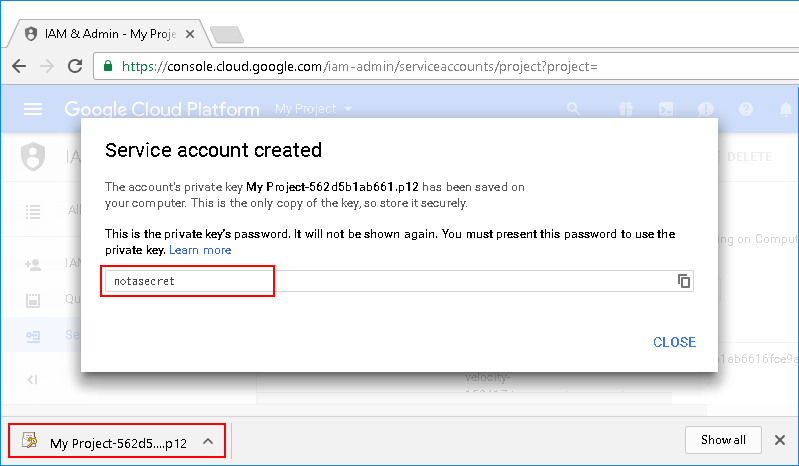
Download and save this private key, you’ll need that later.
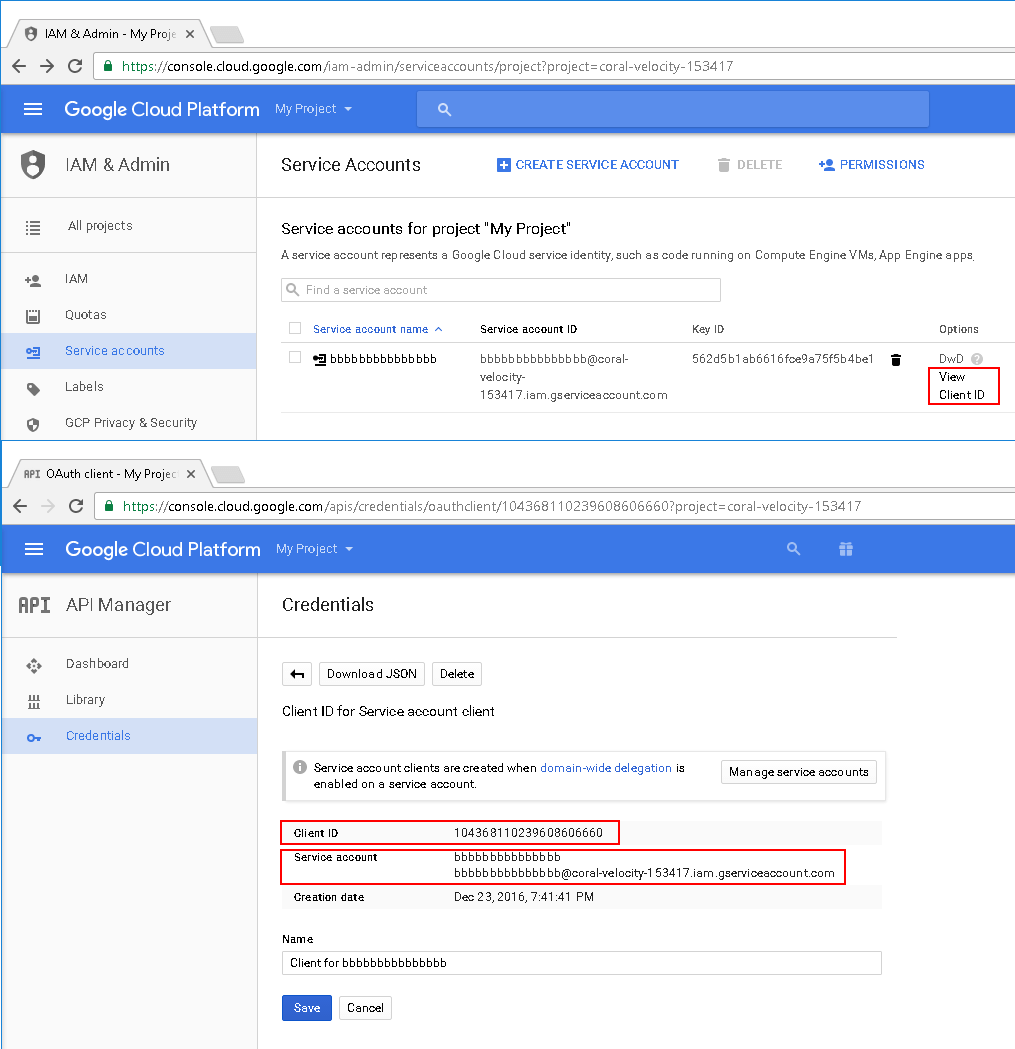
Make a note of the Client ID (Your-ID.apps.googleusercontent.com), Email address (Your-ID@developer.gserviceaccount.com) and makes sure you have saved the private key (XYZ-privatekey.p12) somewhere – you will need these later.
Google Apps Dashboard
Next step is to authorize access for newly created service account.
Visit your domain administration panel:
https://www.google.com/a/cpanel/yourdomain.com/ManageOauthClients
Then click “Advanced tools”, “Authentication” and “Manage third party OAuth Client access”.
On this screen you can authorize service account to access email scope:
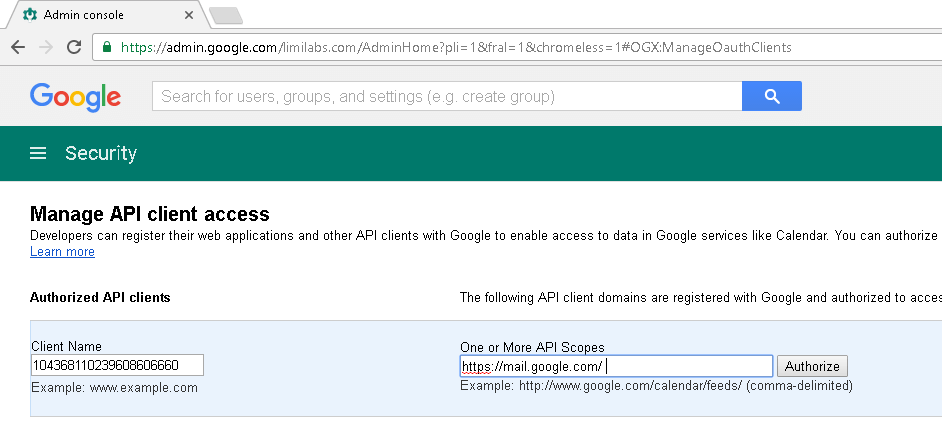
Use previously remembered Client ID and “https://mail.google.com/”, which is IMAP/SMTP API scope:
Client Name: Your-ID.apps.googleusercontent.com
One or More API Scopes: https://mail.google.com/
Google.Apis
Use Nuget to download “Google.Apis.Auth.Mvc” and “Google.Apis.Auth” packages.
Access IMAP/SMTP server
// C#

using System.Security.Cryptography.X509Certificates;
using System;
using System.Threading;
using Limilabs.Client.IMAP;
using Limilabs.Test.Constants;
using Google.Apis.Auth.OAuth2;
using Limilabs.Client.Authentication.Google;


const string serviceAccountEmail = "Your-ID@developer.gserviceaccount.com";
const string serviceAccountCertPath = @"c:\XYZ-privatekey.p12";
const string serviceAccountCertPassword = "notasecret";
const string userEmail = "user@your-domain.com";

X509Certificate2 certificate = new X509Certificate2(
    serviceAccountCertPath,
    serviceAccountCertPassword,
    X509KeyStorageFlags.Exportable);

ServiceAccountCredential credential = new ServiceAccountCredential(
    new ServiceAccountCredential.Initializer(serviceAccountEmail)
    {
        Scopes = new[] { GoogleScope.ImapAndSmtp.Name },
        User = userEmail
    }.FromCertificate(certificate));

bool success = credential.RequestAccessTokenAsync(CancellationToken.None).Result;
Assert.IsTrue(success);

using (Imap imap = new Imap())
{
    imap.ConnectSSL("imap.gmail.com");
    imap.LoginOAUTH2(userEmail, credential.Token.AccessToken);

    imap.SelectInbox();

    foreach (long uid in uids)
    {
        var eml = client.GetMessageByUID(uid);
        IMail email = new MailBuilder().CreateFromEml(eml);
        Console.WriteLine(email.Subject);
    }

    imap.Close();
}
' VB.NET

Imports System.Security.Cryptography.X509Certificates
Imports System.Threading
Imports Limilabs.Client.IMAP
Imports Limilabs.Test.Constants
Imports Google.Apis.Auth.OAuth2
Imports Limilabs.Client.Authentication.Google


Const  serviceAccountEmail As String = "Your-ID@developer.gserviceaccount.com"
Const  serviceAccountCertPath As String = "c:\XYZ-privatekey.p12"
Const  serviceAccountCertPassword As String = "notasecret"
Const  userEmail As String = "user@your-domain.com"

Dim certificate As New X509Certificate2(serviceAccountCertPath, serviceAccountCertPassword, X509KeyStorageFlags.Exportable)

Dim credential As New ServiceAccountCredential(New ServiceAccountCredential.Initializer(serviceAccountEmail) With { _
	Key .Scopes = New () {GoogleScope.ImapAndSmtp.Name}, _
	Key .User = userEmail _
}.FromCertificate(certificate))

Dim success As Boolean = credential.RequestAccessTokenAsync(CancellationToken.None).Result
Assert.IsTrue(success)

Using imap As New Imap()
	imap.ConnectSSL("imap.gmail.com")
	imap.LoginOAUTH2(userEmail, credential.Token.AccessToken)

	imap.SelectInbox()

	For Each uid As Long In uids
		Dim eml = client.GetMessageByUID(uid)
		Dim email As IMail = New MailBuilder().CreateFromEml(eml)
		Console.WriteLine(email.Subject)
	Next

	imap.Close()
End Using