- OAuth 2.0 with Outlook.com over IMAP for installed applications
- OAuth 2.0 with Outlook.com over IMAP for web applications

OAuth is an open protocol to allow secure API authorization in a simple and standard method from desktop and web applications.
This article describes using OAuth 2.0 to access Outlook.com IMAP and SMTP servers using .NET IMAP component in web application scenario (ASP.NET/ASP.NET MVC). You can also use OAuth 2.0 with Outlook.com for installed/native applications.
DotNetOpenAuth
First download the latest version of DotNetOpenAuth – it’s free, open source library that implements OAuth 2.0: http://www.dotnetopenauth.net
Add it as a reference and import namespaces:
// c#

using DotNetOpenAuth.OAuth2;
' VB.NET

Imports DotNetOpenAuth.OAuth2
Register Application
Before you can use OAuth 2.0, you must register your application using the application management site. After you’ve registered, go to the My applications and create new application. On “API Settings” page, copy “Client ID” and “Client secret” values and specify “Redirect domain“, which you’ll need later.

127.0.0.1 fake-domain-9065436322.com
Now we can define clientID, clientSecret, redirect url and scope variables, as well as Outlook.com OAuth 2.0 server addresses. Scope basically specifies what services we want to have access to. In our case it is user’s email address and IMAP/SMTP access:
string clientID = "000000014810009D";
string clientSecret = "wiRCccXnq1uyKcXnq1uyK";
string redirectUri = "http://fake-domain-9650932456.com/OAuth2.aspx";

AuthorizationServerDescription server = new AuthorizationServerDescription
{
    AuthorizationEndpoint = new Uri("https://login.live.com/oauth20_authorize.srf"),
    TokenEndpoint = new Uri("https://login.live.com/oauth20_token.srf"),
    ProtocolVersion = ProtocolVersion.V20,
};

List<string> scope = new List<string> { OutlookScope.ImapAndSmtp.Name, OutlookScope.EmailAddress.Name };
Obtain an OAuth 2.0 access token
As we are using ASP.NET we’ll use WebServerClient class:
WebServerClient consumer = new WebServerClient(server, clientID, clientSecret);

// Here redirect to authorization site occurs
consumer.RequestUserAuthorization(scope, new Uri(redirectUri));
If you use ASP.NET MVC the last line is different:
// Here redirect to authorization site occurs
OutgoingWebResponse response = consumer.PrepareRequestUserAuthorization(
    scope, new Uri(redirectUri));
return response.AsActionResult();
At this point user is redirected to Microsoft to authorize the access:
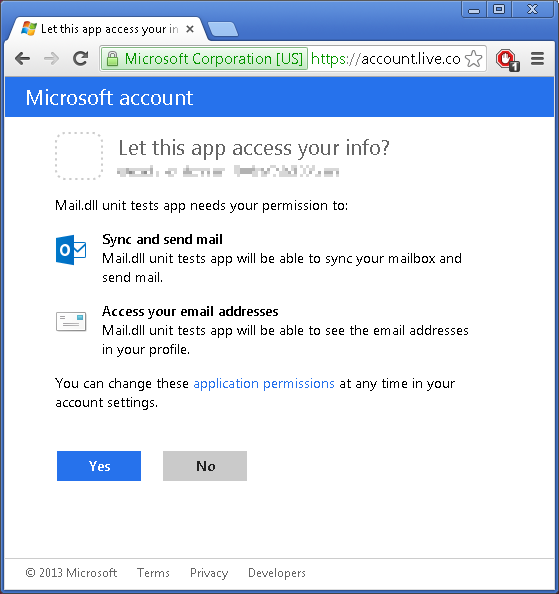
After this step user is redirected back to your website (http://fake-domain-9650932456.com/OAuth2.aspx). Following is this callback code. Its purpose is to get a refresh-token and an access-token:
WebServerClient consumer = new WebServerClient(server, clientID, clientSecret);
IAuthorizationState grantedAccess = consumer.ProcessUserAuthorization(null);

string accessToken = grantedAccess.AccessToken;
An access token is usually short lived, and allows you to access the user’s data. You also received a refresh token. A refresh token can be used to request a new access token once the previous expired.
Access IMAP/SMTP server
Finally we’ll ask Microsoft for user’s email and use LoginOAUTH2 method to access Outlook.com IMAP server:
OutlookApi api = new OutlookApi(accessToken);
string user = api.GetEmail();

using (Imap imap = new Imap())
{
    imap.ConnectSSL("imap-mail.outlook.com");
    imap.LoginOAUTH2(user, accessToken);

    imap.SelectInbox();
    List<long> uids = imap.Search(Flag.Unseen);

    foreach (long uid in uids)
    {
        string eml = imap.GetMessageByUID(uid);
        IMail email = new MailBuilder().CreateFromEml(eml);
        Console.WriteLine(email.Subject);
    }
    imap.Close();
}
Refreshing access token
An access token is usually short lived. The main reason behind this is security and prevention of replay attacks. This means that for long-lived applications you need to refresh the access token.
In most cases web applications don’t need to refresh access token (they request new one every time), thus when using WebServerClient refresh token is not sent. To force sending refresh token you need to add “wl.offline_access” to requested scopes:
List<string> scope = new List<string> { OutlookScope.ImapAndSmtp.Name, OutlookScope.EmailAddress.Name, OutlookScope.OfflineAccess.Name };
Your refresh token will be sent only once – don’t loose it!
We recommend storing entire IAuthorizationState object received from WebServerClient.ProcessUserAuthorization method call. This object contains both: refresh token and access token, along with its expiration time.
The process of refreshing access token is simple:
IAuthorizationState grantedAccess = ...
consumer.RefreshAuthorization(grantedAccess, TimeSpan.FromMinutes(20));
In the example above the access token will not be refreshed if its remaining lifetime exceeds 20 minutes.
Apps and services you’ve given access
Users can manage consent for applications and services that can access some of their data on consent panel